

awaBerry MCP Server
Connect AI Agents to Real Devices — via the Model Context Protocol.
Products: MCP Server
Give AI Agents Hands — On Your Actual Devices.
The awaBerry MCP Server is an open-source implementation of the Model Context Protocol (MCP) that bridges AI agents directly to your registered awaBerry devices. Whether you use Claude Desktop, a custom agentic pipeline, or any MCP-compatible tool, the awaBerry MCP Server lets agents connect to real machines, execute terminal commands, interact with databases, and transfer files — all secured by the awaBerry Zero-Trust Agentic API.
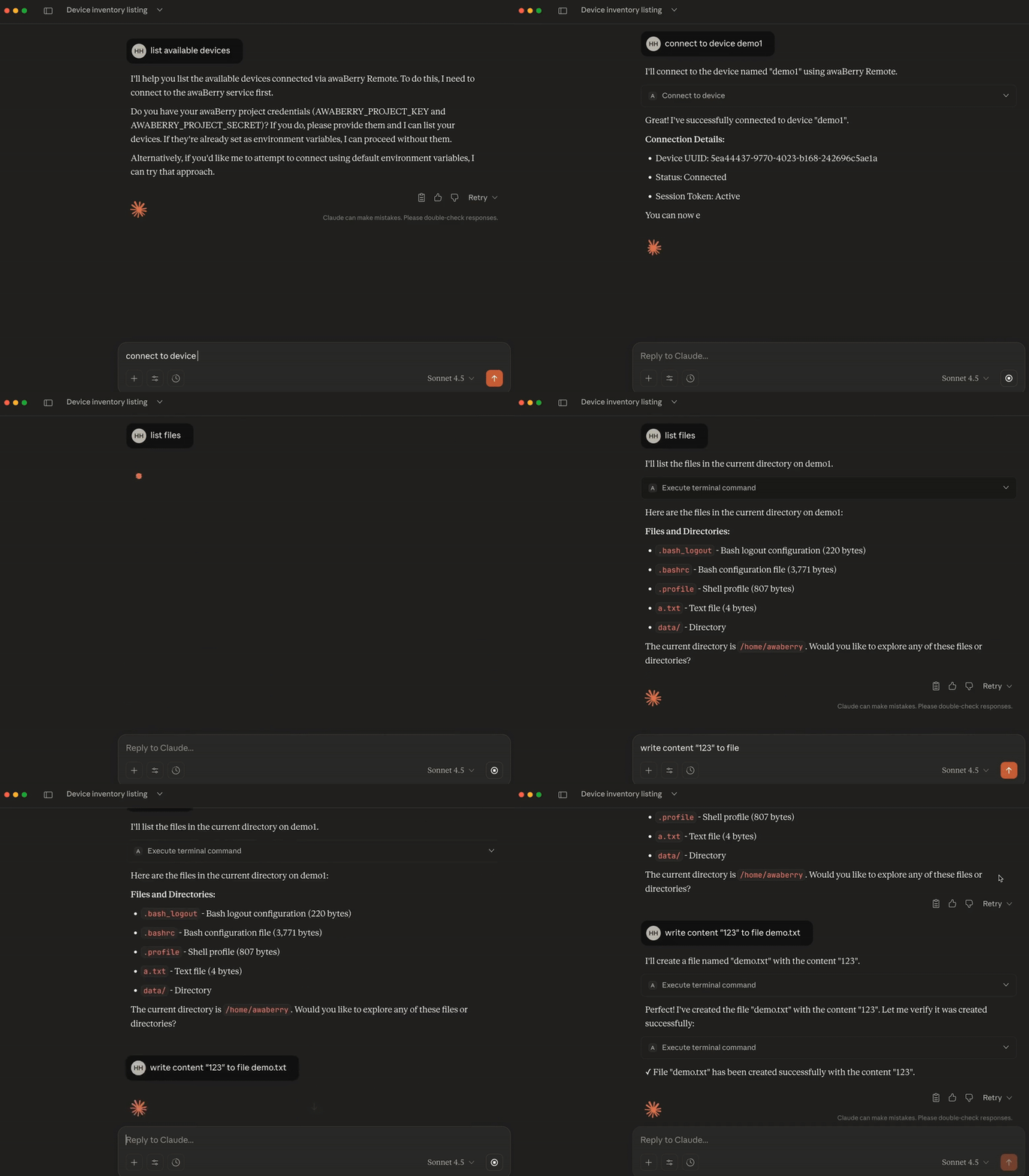
awaBerry MCP Server integrated with Claude Desktop — AI agent connecting to a registered device and running commands in real time.
MCP Client
Connects to Claude Desktop and other MCP-compatible AI environments. Authenticate with a Project Key and Secret, then let your AI agent connect to devices, manage sessions, and run commands using natural language or direct tool invocations.
MCP Server Implementations
Two deployment modes: a JSON/HTTP server for company intranets and cloud infrastructure (Express.js, /mcp POST endpoint), and a Cloudflare Worker deployment for globally distributed, firewall-bypassing remote control — no VPN, no open ports required.
MCP Tools
What AI Agents Can Do
The createMcpServer function exposes a suite of tools that AI agents invoke directly:
connect_to_device
Establish a persistent, secure terminal session on any registered awaBerry device. The agent authenticates via Project Key and Secret — no SSH keys, no firewall changes. The connection is brokered through awaBerry's outbound-only Zero-Trust infrastructure.
execute_terminal_command
Run any shell command on the connected device and receive the output back directly in the agent's context. Supports long-running commands, script execution, file management, and full shell interaction — all within the permission boundaries you defined in your Agentic API project.
execute_database_command_postgres
Execute arbitrary SQL statements against a PostgreSQL database running on the connected device. Ideal for AI-driven data aggregation, reporting, and analytics pipelines that need live, structured data from the edge.
describe_database_schema_postgres
Retrieve the full schema of a PostgreSQL database — tables, columns, types, and relationships — so the AI agent can reason about the dataset before crafting precise queries or transformations.
Deployment
Two Ways to Run the MCP Server
JSON / HTTP Server
Run the MCP Server as an Express.js HTTP service on your own infrastructure — inside a company intranet, a private cloud, or a dedicated server. AI agents connect to it via the /mcp POST endpoint. Ideal for teams with existing infrastructure who want full control over the deployment environment.
npm run start:mcp:json
Cloudflare Worker
Deploy the MCP Server as a Cloudflare Worker for a globally distributed, serverless endpoint. The worker handles incoming MCP requests, manages sessions with agentic.awaberry.net, and relays commands to your devices — without requiring any open firewall ports or a dedicated server.
See cloudflare/worker/awaberrymcpserver/ in the repository.
Claude Desktop (mcpclient)
Configure the mcpclient directly in Claude Desktop's MCP configuration. Your AI conversations gain the ability to connect to your devices, run commands, and read or write data — through natural language, powered by Claude's reasoning and awaBerry's secure device access layer.
See mcpclient/ in the repository.
Security
Zero-Trust Access for AI Agents
Every connection made by the MCP Server inherits the full security model of the awaBerry Agentic API:
Project-Scoped Credentials
AI agents authenticate using a Project Key and Secret tied to a specific Agentic API project. The project defines exactly which devices are accessible, at which privilege level, with which filesystem paths, and with which command allowlist. The agent can only do what the project permits — nothing more.
Instant Revocation
Delete the Agentic API project and every active MCP session is terminated immediately. No residual credentials, no cleanup scripts. Revocation is instantaneous and complete — critical for temporary AI workloads, one-off analysis tasks, or external collaborator access.
Quick Start
Get Started in Minutes
Prerequisites: Node.js and Git. Then follow these steps:
1. Clone & Install
Clone the repository from GitHub and install dependencies:
git clone https://github.com/awaberry/mcp_server_awaberrycd mcp_server_awaberry && npm install
2. Create an Agentic API Project
In your awaBerry dashboard, navigate to /agentic, create a new project, select your target device(s), enable Programmatic Access, and configure the permission scope. Copy the generated Project Key and Secret.
3. Configure & Run
Set your projectKey, projectSecret, and deviceName as environment variables (or in your Claude Desktop MCP config). Start the server with npm run start:mcp:json (HTTP) or configure the stdio client for Claude Desktop. Your AI agent is now connected.
Plans
Start for Free. Scale as You Grow.
Business
Automate operations, manage fleets, and enable secure remote work for your entire team.
Try for Free
Private
Access your home devices, automate personal tasks, and share access with family — for free.
Freemium Plan Available
Research
Access lab hardware, automate data collection, and collaborate across institutions.
Request Free Usage
Connect your AI agent to your devices — right now.
Open source. Zero-Trust. Ready in minutes.

