

The Agentic API
Device Access As-A-Service — Zero-Trust, Granular Permissions, Instant Revocation.
Products: The Agentic API
Secure Access to Any Device — For Agents, Scripts, and People.
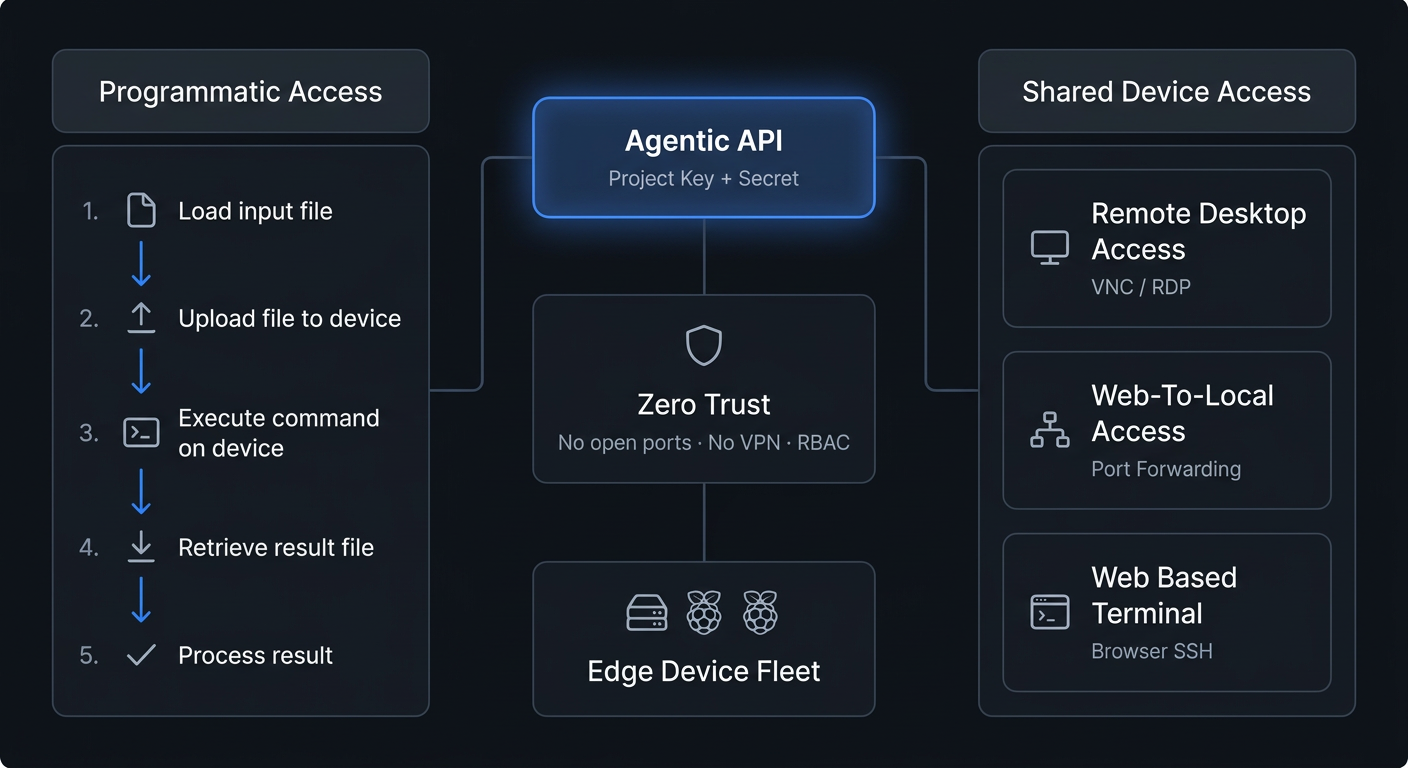
The awaBerry Agentic API transforms how you interact with and manage your distributed devices by offering seamless device access as-a-service. Whether you are integrating programmatic orchestration across multiple systems, empowering AI agents with direct device access, or providing secure zero-trust access for collaborators — the Agentic API is your central hub. All connections are secured by zero-trust architecture with precise permission controls.
Programmatic Access
Unique API keys and secrets let scripts, AI models, or CI pipelines connect securely to your devices. Enables limitless orchestration, data aggregation, and autonomous operations without manual intervention.
Shared Device Access
Generate secure credentials to grant direct user access — terminal, remote desktop, and port forwarding — to specific devices for support technicians or collaborating developers. No VPN. No open ports.
Core Use Cases
What You Can Do With It
AI-Driven Data Aggregation & Analytics
Load data from distributed edge devices, process it via LLMs to generate comprehensive insights, and query or aggregate results across your fleet. Integrate directly as an MCP server in agentic workflows — AI agents authenticate with a Project Key, read from scoped directories, and write results back, all within a precisely defined permission boundary.
Automated IT Operations & System Maintenance
Streamline infrastructure management by automating installations, proactive monitoring, and routine data backups across your entire device fleet. Enable privileged access for root-level operations, or lock down a project to specific backup commands and directories for least-privilege automation. One project can target multiple devices simultaneously.
Secure Remote Support & Developer Collaboration
Instantly grant an expert access to troubleshoot a critical issue, or allow a developer to securely enter a system to debug code — without opening firewall ports or provisioning a VPN. Share a Project Key via the built-in email draft feature. Delete the project when the work is done. Total provisioning time: under two minutes.
Security Architecture
Zero Trust at Every Layer
The Agentic API is built from the ground up on a Zero Trust Architecture, ensuring maximum security for your infrastructure.
No Open Ports or VPNs
All connections — whether programmatic or direct user access — are securely tunnelled through awaBerry's outbound-only HTTPS infrastructure. You never need to expose devices to the public internet or manage complex VPN configurations.
Granular Least-Privilege Access
Every project enforces four independent dimensions: privilege level (standard user or root), filesystem access (named paths or all folders), write permissions, and command execution (allowlist or all). No dimension inherits from another.
Instant Revocation
Access is governed by uniquely generated Project Keys and Secrets that can be revoked or deleted instantly from the dashboard. Delete a project = immediate termination of all access. Zero residual artifacts. No cleanup required.
Setup Guide
How to Set Up an Agentic Project
Empower your applications and scripts with secure device access in six steps:
1. Navigate & Create
Go to the Agentic API Project Overview page (/agentic) and click Add new project. Enter a unique Project Name and a detailed Project Description.
2. Select Devices & Enable Mode
Check the boxes next to the specific registered devices this project should control. Under the permissions section, select Allow access via programmatic access (awaBerry Agentic API).
3. Configure Permissions & Save
Set privilege level (standard user or root), filesystem scope (all folders or named paths with optional write access), and command scope (all commands or an explicit allowlist). Click Create project — the system generates your unique Project Key and Secret.
Grant secure, direct user access for support or collaboration in minutes:
1. Define & Select
Create a project with an identifiable name and description. Check the box next to the specific device you want to share. Enable Allow access via user connections (awaBerry Anywhere).
2. Configure Capabilities
By default this grants standard awaberry user terminal access. Optionally enable Allow start/stop of Remote Desktop or Allow start/stop of Web-to-Local Ports to extend the guest's capabilities.
3. Share & Revoke
Use the built-in button to create an email draft containing the Project Key and Secret. Share it with the intended user. When the work is done, delete the project — access terminated immediately, no cleanup required.
Connect your AI agents to your devices.
Grant AI agents, scripts, or collaborators precisely scoped access.

