

Smart Automation Framework
Instruct in Plain English. Execute with Deterministic Precision. Zero Tokens at Runtime.
Products: Smart Automation Framework
From Natural Language to Autonomous Execution.
The awaBerry Smart Automation Framework bridges the gap between natural language intent and autonomous, local device execution. By leveraging the reasoning capabilities of the Google Gemini CLI, it transforms your existing devices into intelligent, self-operating agents — whether you need to automate complex web interactions, manage local file systems, or orchestrate multi-step data processing pipelines.
Capabilities
What It Automates
The framework handles tasks that traditionally required dedicated software development or tedious manual intervention:
Intelligent Web Automation
Bypass complex logins, navigate dynamic single-page applications, and extract structured data using headless browsers (Playwright/Puppeteer) generated on the fly from a plain-English description of what you need.
Local System Management
Parse local log files, categorize incoming documents based on content, manage local databases, and automate file system operations — all running directly on the host machine that owns the data.
API & Service Orchestration
Fetch data from uncooperative endpoints, transform JSON/XML payloads, and push sanitized data to your internal dashboards or CRMs — fully automated, on a schedule.
Legacy System Bridging
Interact with older software UIs or terminal interfaces that lack modern APIs via OS-level automation scripts generated by the Gemini CLI from your plain-English description.
Architecture
How It Works
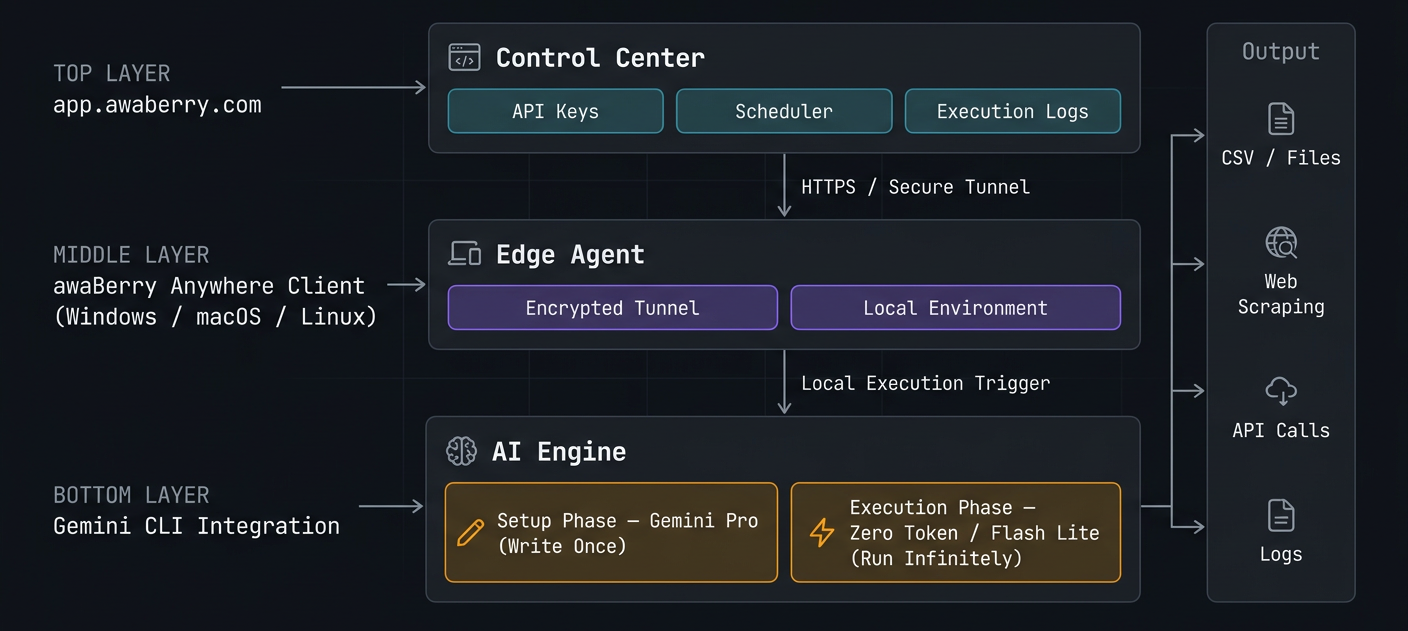
The framework operates on a secure, distributed architecture designed for flexibility and zero-trust security.
Control Center (Web Frontend)
Define, manage, and monitor automations via the secure web dashboard at app.awaberry.com — your interface for API keys, scheduling, and execution logs.
Edge Agent (awaBerry Anywhere Client)
Execution happens locally on your target device (Windows, macOS, or Linux) via a secure, encrypted tunnel back to the control centre. Data never leaves the device unless your script explicitly sends it somewhere.
AI Engine (Gemini CLI Integration)
Installed directly on your device, the framework uses your configured Google Gemini API key to translate high-level instructions into executable code tailored to that machine's specific environment.
Core Concepts
Setup vs. Execution — The Key Split
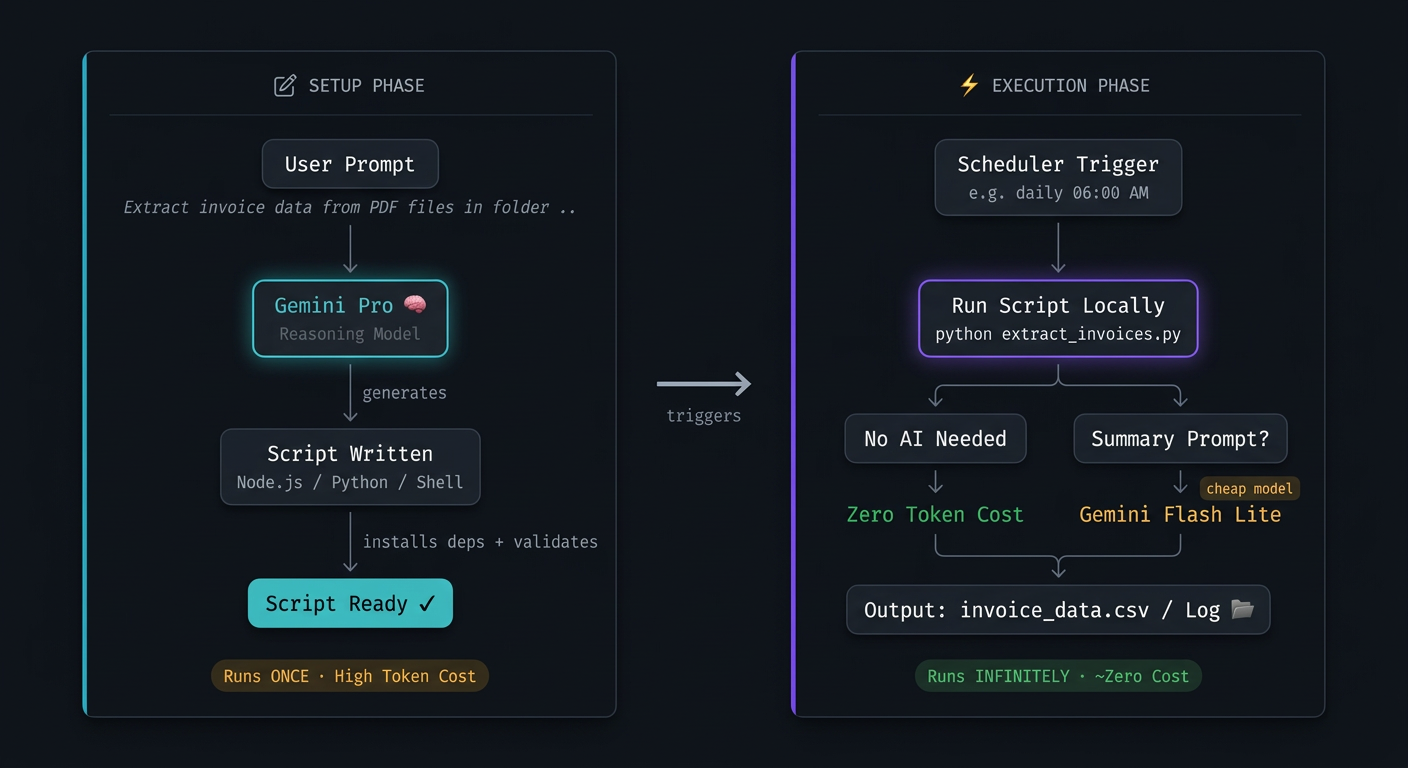
To maximise efficiency and minimise costs, the framework strictly separates creating logic from running it. AI tokens are spent once; execution runs forever.
⚙️ Project Setup (Writing Phase)
The "thinking" phase. A capable reasoning model (e.g., Gemini 2.5 Pro) analyses your prompt, explores the local environment, and writes a deterministic script (JavaScript, Python, or Shell). This happens exactly once. Token cost: approximately 7,000–18,000 tokens.
▶️ Project Execution (Running Phase)
The "doing" phase. The pre-generated local script runs on a schedule — fast, reliable, and consistent. Zero AI tokens consumed. If AI summarization is needed at runtime, cheaper models like Gemini 2.5 Flash Lite are called selectively (~100–500 tokens per run).
Concrete Example
Automated Invoice Processing
Every business receives invoices — and someone has to open each one, read the numbers, and re-key data into an accounting tool. This is repetitive, error-prone, and costly.
The Problem
A missed or miskeyed invoice causes reconciliation failures that only surface weeks later. Manual processing drains staff time and margin with zero added value.
The Solution
The framework watches a local folder for new PDF invoices. When one arrives, it automatically extracts every relevant field — vendor name, invoice number, date, line items, VAT, and total — then appends a structured row to your accounting CSV.
How It Runs
Once written, the script runs as a background daemon — continuously monitoring for new files, zero intervention required. File detection costs zero tokens — pure local filesystem event. Only optional AI summarization incurs a token cost.
Setup Cost
~8,000 tokens via reasoning model — one time only.
Per Execution (PDF extraction)
~500–1,500 tokens via Gemini Flash Lite — only if AI summarization is configured.
File Detection & Script Execution
Zero tokens — local CPU only, every time.
See how it combines with the Agentic API
Intelligence + Reach = Autonomous Infrastructure.

