

Gain pixel-perfect graphical control over your Apple, Linux, and Windows machines — from anywhere — with no VPN and no open ports required. Connect via your browser for quick sessions or use a dedicated native client for maximum performance.
Products: awaBerry Anywhere — Remote
Connection Options
Use the awaBerry web portal to activate and configure your remote desktop connection, then connect with whichever client best fits your session.
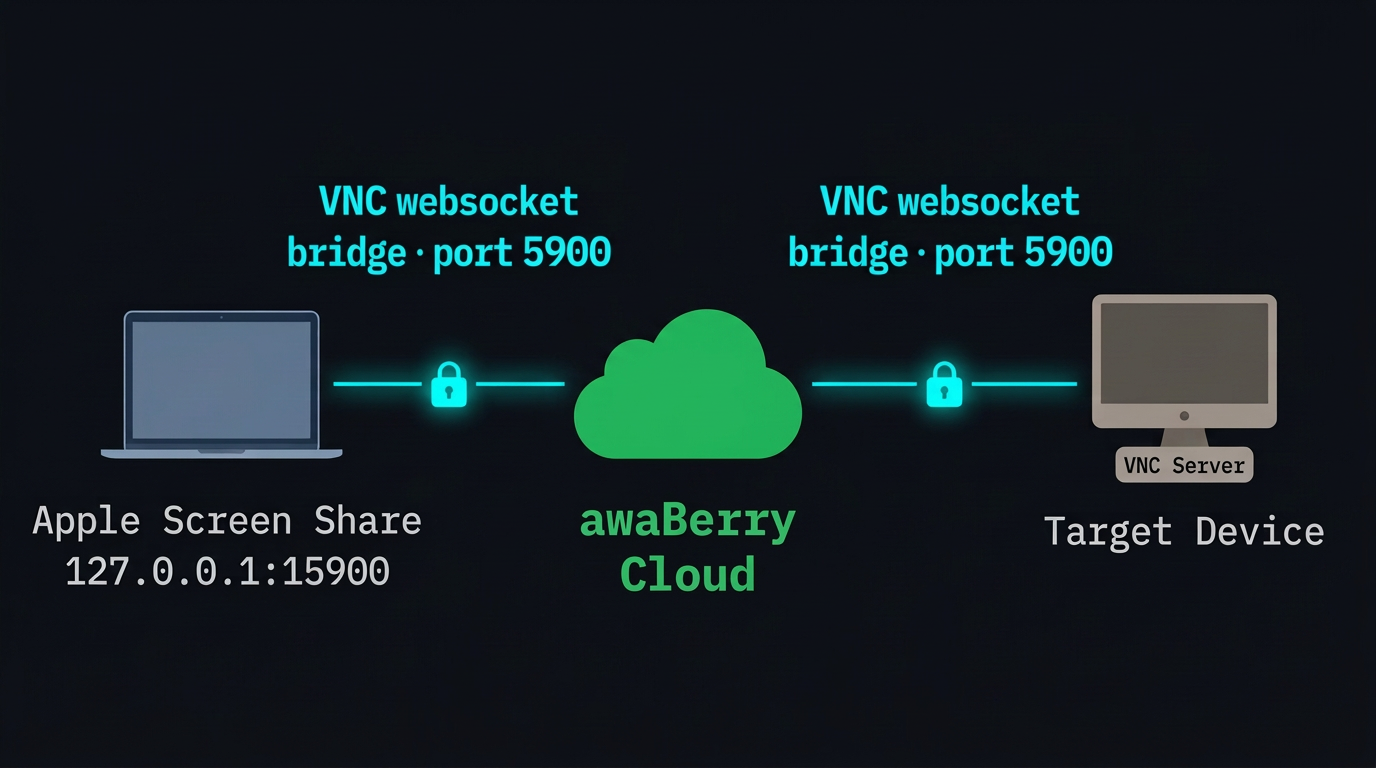
🌐 Browser (VNC)
Zero-install instant access. Click and connect from any modern browser for an immediate VNC session — no client software to install or configure.
🖥️ Native Client (VNC & RDP)
Lower latency and higher performance via Apple Screen Sharing, Remmina, or RealVNC for VNC. High-performance Microsoft Remote Desktop for RDP sessions.
Setup & Activation
Configuring Remote Desktop
Platform-specific setup guides are built directly into the portal — no external documentation required. Cross-platform step-by-step instructions cover macOS, Windows, and Linux.
Setting Up VNC
Enable Screen Sharing (Mac), Remote Desktop (Windows), or VNC server (Linux) in system settings. awaBerry's intelligent setup assistant automatically detects when ports 3389 (RDP) or 5900 (VNC) are listening and advances you to the next step — no manual port checks needed.
Starting & Managing VNC Sessions
One-Click Play/Stop: start and stop VNC server sessions with an intuitive status-aware interface. Smart Scheduling: configure specific days and times for automated VNC server activation. Real-Time Usage Monitoring: live display of daily VNC minutes used vs. your license allowance with proactive alerts before limits are reached. Resilient sessions handle SSH disconnections automatically.
Connecting via VNC / RDP Client
Browser Access: zero-install, click and connect from any modern browser. Native VNC Client: simple setup scripts bridge the awaBerry tunnel to your preferred Mac, Windows, or Linux application. Smart Auto-Disconnect: idle sessions drop after 10 minutes. One-Click Sharing: share connection instructions with team members via email or messenger instantly.
Key Benefits
Secure, Flexible Graphical Access
No VPN / No Open Ports
Zero-trust tunnel handles security end-to-end. Your devices are never exposed to the public internet.
Use Native Tools
Microsoft RDP, Apple Screen Sharing, Remmina — tools you already know. awaBerry handles the secure tunnel behind the scenes.
Usage Transparency
Built-in daily VNC usage statistics — no billing surprises. Proactive alerts before limits are reached.
Automated Scheduling
Remote listening windows activate exactly when you need them. Set once, runs on schedule without manual intervention.
Plans
Start for Free. Scale as You Grow.
Business
Automate operations, manage fleets, and enable secure remote work for your entire team.
Try for Free
Private
Access your home devices, automate personal tasks, and share access with family — for free.
Freemium Plan Available
Research
Access lab hardware, automate data collection, and collaborate across institutions.
Request Free Usage

