

Stop using generic OS images. awaBerry generates custom-built installers tailored specifically to your hardware, pre-configured to link the device directly to your account the moment the OS boots. No manual configuration required.
Products: awaBerry Anywhere — Connect
How It Works
A transparent, three-step process — review exactly what you're connecting to before confirming access.
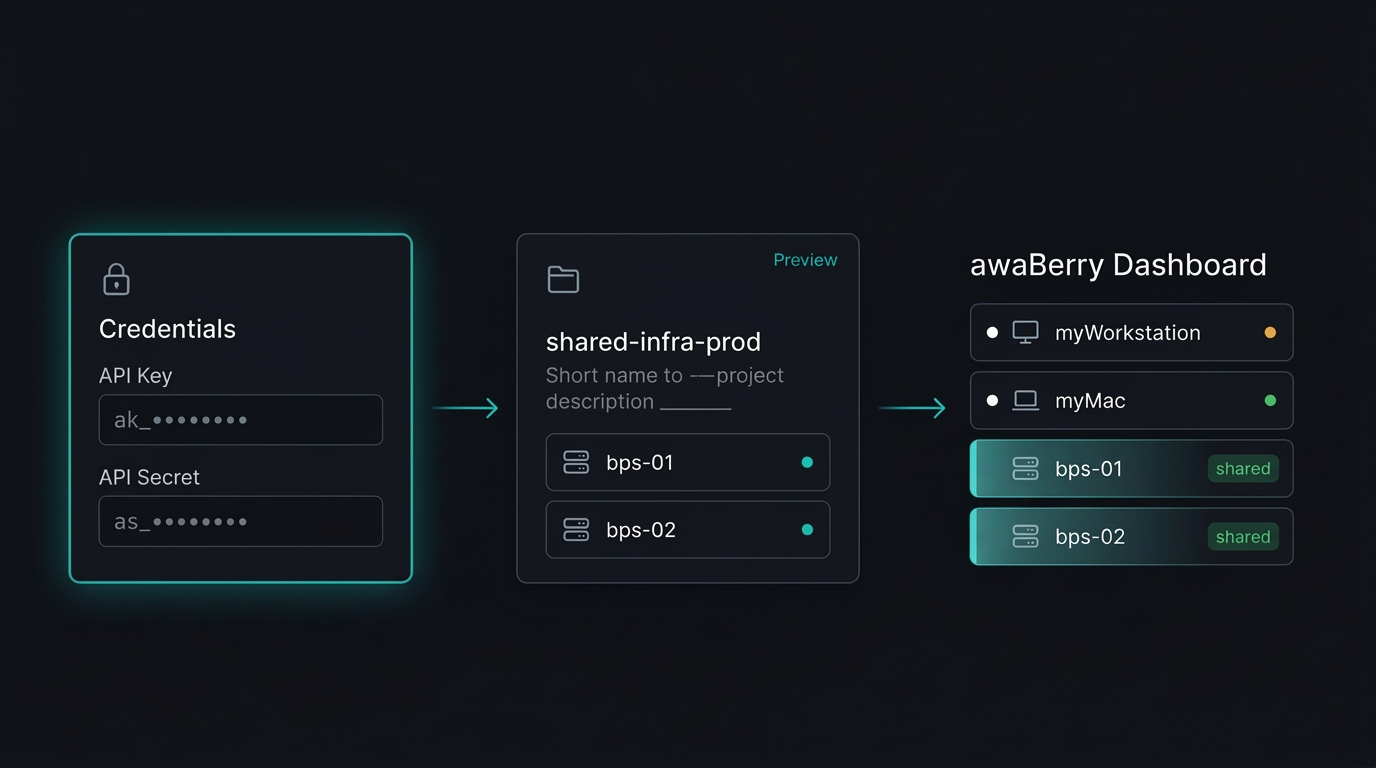
1. Enter Credentials
Input the API Key and API Secret provided by the device owner. Credentials are purpose-built for delegation — no master passwords are ever shared.
2. Preview the Project
Before committing, you see the Project Name, Description, and the exact list of accessible devices. No blind connections — full transparency before you accept.
3. Add with One Click
Confirm and the shared devices are instantly added to your awaBerry workspace, ready for immediate management alongside your own hardware.
Key Benefits
Secure, Transparent Collaboration
Granular, Secure Access
Access is strictly scoped to the shared project — no accidental exposure of unrelated hardware. The permission model enforces least privilege at every level.
Transparent Verification
The Preview step builds trust by showing exactly what you're connecting to before you accept. No surprises, no blind handshakes.
No Shared Passwords
API Key/Secret pairs are purpose-built for delegation, keeping master credentials private. Revocation is instant — delete the project and access ends immediately.
Instant Collaboration
Once added, shared devices appear alongside your own hardware for immediate joint administration. No separate login, no additional setup.
Plans
Start for Free. Scale as You Grow.
Business
Automate operations, manage fleets, and enable secure remote work for your entire team.
Try for Free
Private
Access your home devices, automate personal tasks, and share access with family — for free.
Freemium Plan Available
Research
Access lab hardware, automate data collection, and collaborate across institutions.
Request Free Usage
Start Collaborating
Secure shared device access — no VPNs, no shared passwords.

