

Stop using generic OS images. awaBerry generates custom-built installers tailored specifically to your hardware, pre-configured to link the device directly to your account the moment the OS boots. No manual configuration required.
Products: awaBerry Anywhere — Connect
Supported Distributions
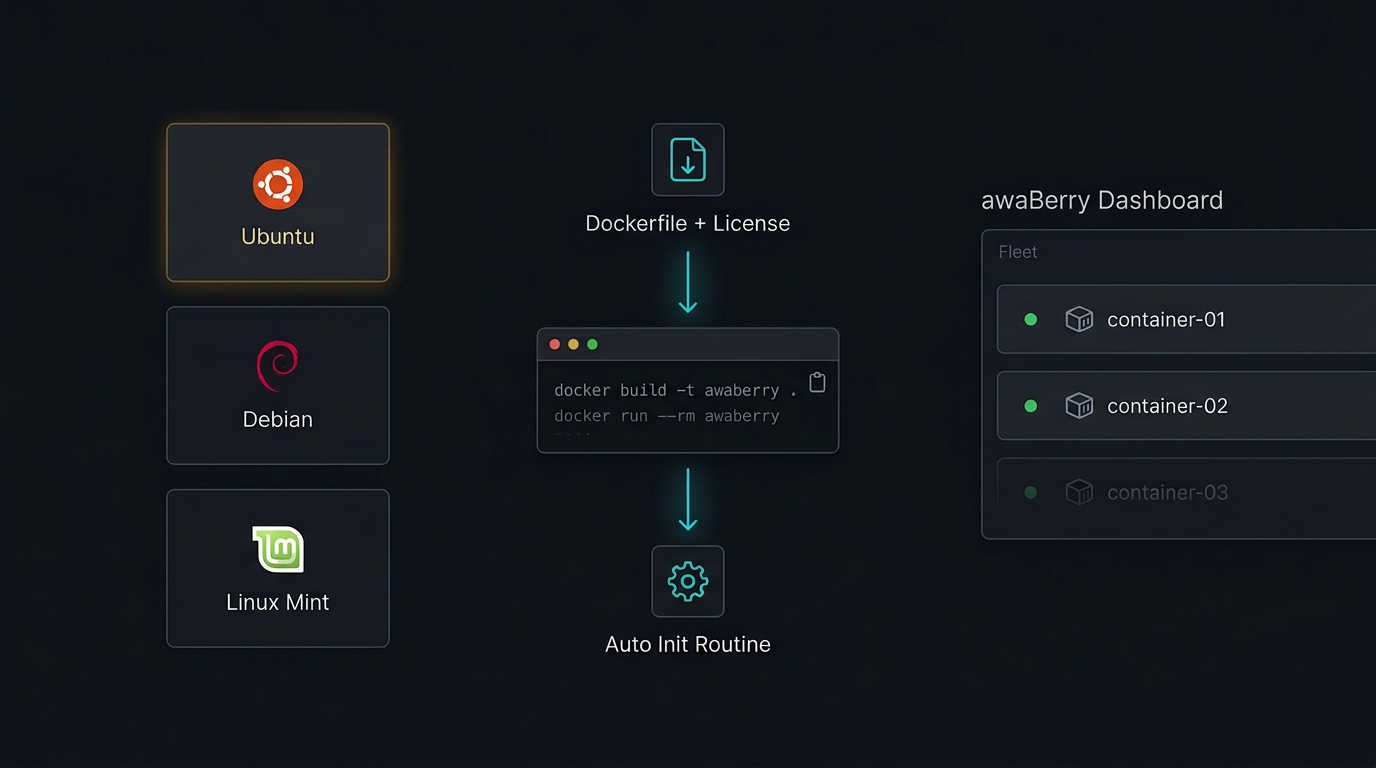
Each distribution path delivers a tailored Dockerfile and device license generated specifically for that OS — no guessing, no manual configuration.
Ubuntu 24.04 LTS
Optimized for enterprise and cloud environments. Pre-configured Dockerfile and license for the most widely deployed Linux server distribution.
Debian Bookworm
Optimized for stable server and self-hosting setups. Reliable, minimal footprint for production and home-lab deployments.
Linux Mint 22
Optimized for desktop and hybrid environments. Full awaBerry capabilities in containerized form on desktop Linux systems.
Deployment Flow
How It Works
From OS selection to a running, connected container — five steps with click-to-copy commands that eliminate manual typing.
1. Choose Your OS
Click the tile for your Linux distribution. awaBerry generates a tailored Dockerfile and device license instantly.
2. Download Assets
Instantly receive your optimized Dockerfile and license file — no waiting, no build queue.
3. Copy-Paste Commands
One-click clipboard copy for docker build, docker run, and docker exec commands. No manual typing of long Docker strings — eliminates typos entirely.
4. Automated Init
The docker exec command triggers the awaBerry installation routine automatically inside the container. The agent installs and connects without manual intervention.
5. Manage Your Fleet
Navigate back to your device list and manage the new container alongside all other connected devices — same dashboard, same access tools.
Key Benefits
Container-First Remote Access
Tailored Configuration
Distribution-specific Dockerfiles — not a one-size-fits-all image. Every container is built for your exact OS version and environment.
Developer Experience First
Click-to-copy commands eliminate manual typing of complex Docker strings. Designed to minimize friction from download to running container.
No Host Modifications
Containerized deployment means your host OS is completely untouched. Add remote access capabilities to any existing infrastructure stack without side effects.
Full awaBerry Capabilities
Adds secure remote access, VNC/RDP remote desktop, and web-to-local port forwarding to existing infrastructure stacks — the complete feature set in a container.
Plans
Start for Free. Scale as You Grow.
Business
Automate operations, manage fleets, and enable secure remote work for your entire team.
Try for Free
Private
Access your home devices, automate personal tasks, and share access with family — for free.
Freemium Plan Available
Research
Access lab hardware, automate data collection, and collaborate across institutions.
Request Free Usage
Connect via Docker Now
Ubuntu · Debian · Linux Mint — containerized in minutes.

