

Stop using generic OS images. awaBerry generates custom-built installers tailored specifically to your hardware, pre-configured to link the device directly to your account the moment the OS boots. No manual configuration required.
Products: awaBerry Anywhere — Connect
Two Hardware Paths
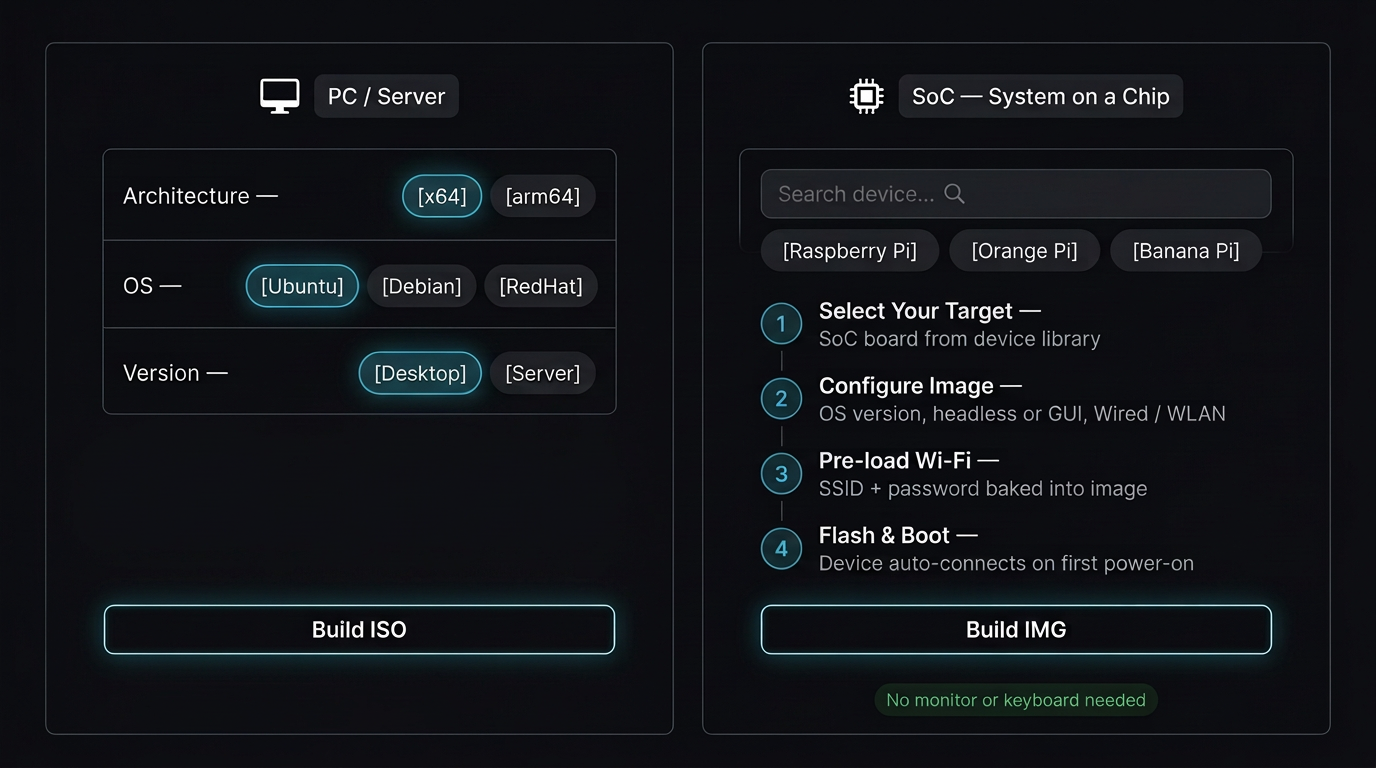
Whether you're deploying to a PC, server, virtual machine, or a headless SoC board, there is a purpose-built installer path for your target hardware.
PC / Server Installer
Build a custom ISO for desktops, laptops, virtual machines (VMware/Cloud), or dedicated servers. Select your CPU architecture (x64, arm64), OS, version, and target environment (Production/Dev). The smart wizard auto-selects options when only one is available.
Devices automatically connect to your awaBerry account post-install — the killer zero-touch feature. The compiled ISO is delivered directly to your inbox as a download link. Free to use today; Bespoke SD Card builder coming soon.
True Headless SoC Installer
Generate flashable IMG files for popular SoC boards: Raspberry Pi, Orange Pi, Banana Pi, and many more. Search or browse by vendor in the extensive device library.
Pre-load Wi-Fi credentials into the image so the device connects to the internet at first power-on — true headless, plug-and-play deployment. Cloud-compiled and emailed to you ready to flash.
List of Supported System on a Chip Devices →System on a Chip
Search for your device
Check if your device is supported for creating a bespoke installer. Click a result to start registration with a freemium account for private usage. The device list is regularly updated.
Deployment Flow
How It Works
From hardware selection to a live, connected device — the build and flash process is designed to be entirely guided.
1. Select Your Target
Choose PC/Server or SoC, then pick your specific hardware from the device library. CPU architecture, OS, and version options are presented for your selection.
2. Define Your Environment
Select CPU architecture, OS, version, desktop environment, and network settings. For SoC boards, pre-configure Wi-Fi credentials for instant headless connectivity at first power-on.
3. Build in the Cloud
We compile your custom installer in the cloud. A download link is delivered directly to your inbox — no local build environment, no waiting at a progress bar.
4. Flash & Boot
Flash to USB or SD card. On first boot, the device automatically connects to your awaBerry account — no manual configuration, no keyboard or monitor required.
Key Benefits
Precision Deployment at Scale
Zero-Touch Onboarding
Automated connection routines are baked into every installer. Devices phone home to your account the moment the OS boots — no manual setup at the device.
Precision Tailoring
Hardware-aware provisioning with exact specs — not generic images. Every installer is generated for your specific CPU architecture, OS, and environment.
Headless Deployment
Pre-baked Wi-Fi means no monitor or keyboard needed for SoC boards. Ideal for deploying to remote locations or embedded environments.
Cloud-Powered Build
No local build environment or toolchain required. Cloud-compiled installers are delivered to your inbox ready to use.
Plans
Start for Free. Scale as You Grow.
Business
Automate operations, manage fleets, and enable secure remote work for your entire team.
Try for Free
Private
Access your home devices, automate personal tasks, and share access with family — for free.
Freemium Plan Available
Research
Access lab hardware, automate data collection, and collaborate across institutions.
Request Free Usage
Build Your Custom Installer
PC, Server, or SoC — a tailored installer ready to flash.

