

Bring any already-running machine — Windows, Mac, or Linux — into your awaBerry ecosystem in minutes. A guided, single-click initialization process abstracts complex setup steps into a simple copy-paste workflow.
Products: awaBerry Anywhere — Connect
Universal Platform Support
awaBerry supports all three major platforms out of the box — no proprietary hardware required. Leverage what you already own.
macOS
Guided Homebrew-based setup with Remote Login (SSH) enabled in a few clicks. Step-by-step instructions handle the entire terminal workflow.
Linux
Broad support for Ubuntu, Debian, and RedHat via standard OpenSSH. Zero-guesswork prerequisites: the platform auto-provides the exact commands needed.
Windows
Modern integration via Windows Subsystem for Linux (WSL), compatible with Windows 10, 11, and Server. Includes a provided autostart script so awaBerry runs silently on every boot.
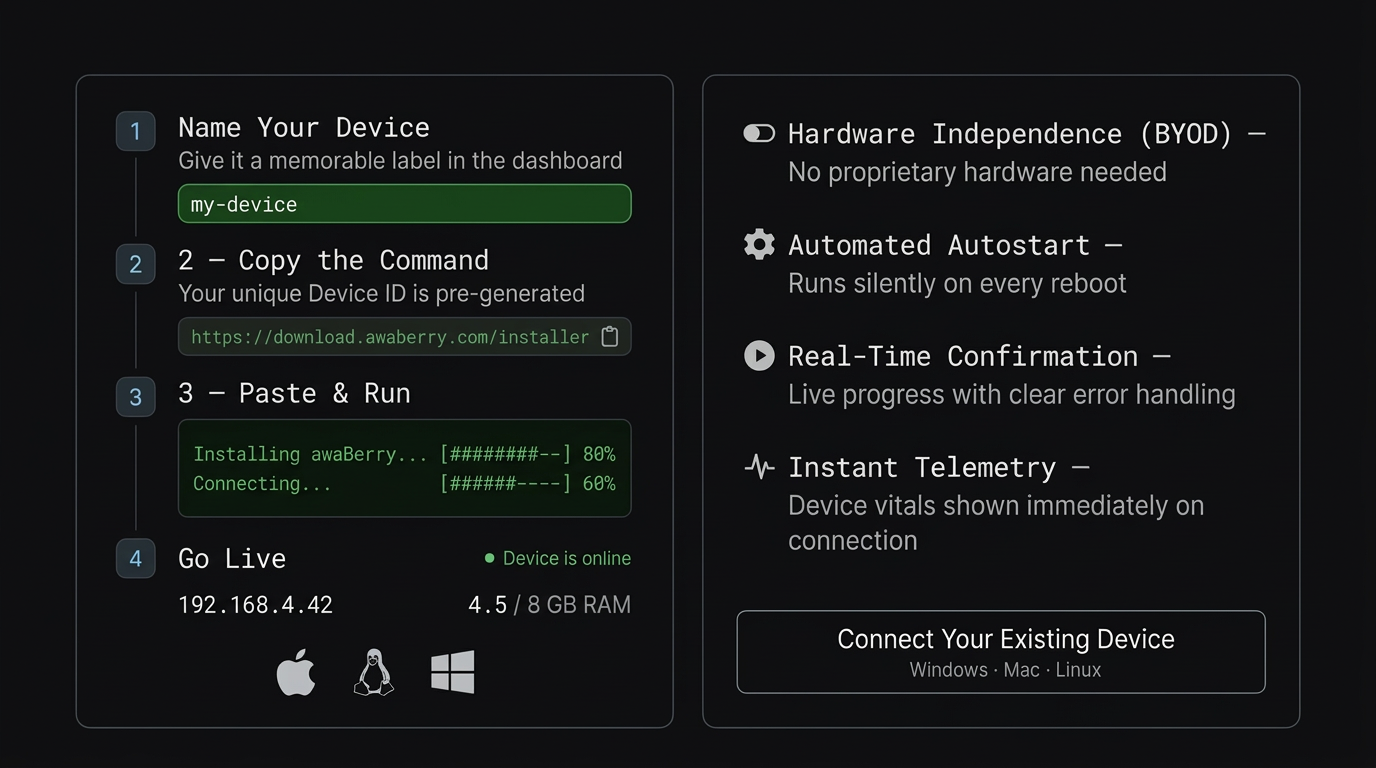
Onboarding Flow
How It Works
Four steps from zero to live — your device is online and monitored with real-time telemetry.
1. Name Your Device
Give it a memorable label in the awaBerry dashboard. Your unique Device ID and installer script are pre-generated and click-to-copy ready.
2. Copy the Command
Your unique Device ID and installer script are pre-generated and ready to copy with a single click — no manual typing required.
3. Paste & Run
Paste into Terminal, WSL, or PowerShell. awaBerry handles the rest — SSH configuration, WSL setup, and Homebrew steps are fully automated.
4. Go Live
The platform monitors the connection in real time and confirms the second your device comes online, displaying instant telemetry (IP address, memory).
Key Benefits
Built for Existing Infrastructure
Hardware Independence (BYOD)
No proprietary hardware required — leverage what you already own. Any Windows, Mac, or Linux machine becomes a registered awaBerry device.
Automated Autostart
Set once, runs silently in the background on every reboot. The awaBerry agent persists across restarts without manual intervention.
Real-Time Confirmation
Live progress monitoring with clear, non-technical error handling. You know the exact moment your device comes online.
Instant Telemetry
Immediate success message showing device vitals upon connection — IP address, memory, and system state confirmed from first boot.
Plans
Start for Free. Scale as You Grow.
Business
Automate operations, manage fleets, and enable secure remote work for your entire team.
Try for Free
Private
Access your home devices, automate personal tasks, and share access with family — for free.
Freemium Plan Available
Research
Access lab hardware, automate data collection, and collaborate across institutions.
Request Free Usage
Connect Your Existing Device
Windows · Mac · Linux — onboarding takes minutes, not hours.

